FlipperPro for selling
Which offer leaves you with more?
Compare what each buyer’s offer leaves after selling and holding costs. Track the winning offer through closing.
No credit card required
| Offer price | Close in | Estimated net |
|---|---|---|
| $405,000 | 15 days | $375,300 |
| $408,000 | 60 days | $374,040 |

Stage 1 / Listing
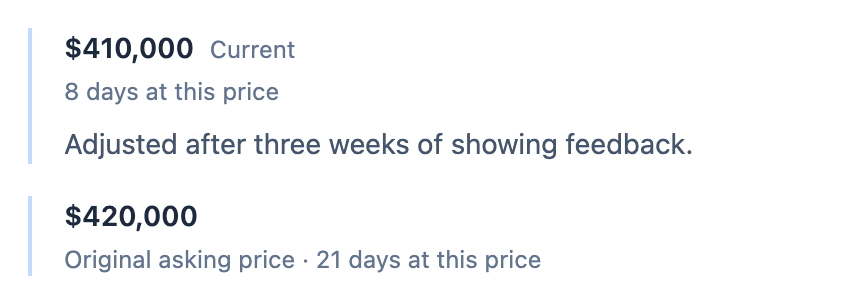
Remember why you changed the price.
When your rehab moves into Selling, its costs and files stay with the project. Add the asking price and list date, then record changes as feedback comes in.
- See the current asking price and days on market alongside your listing details.
- Price History shows when each recorded price took effect and the reason you saved.
- Log showings and buyer feedback to revisit when you discuss the next price adjustment.
Stage 2 / Offers
Put a price on the wait to close.
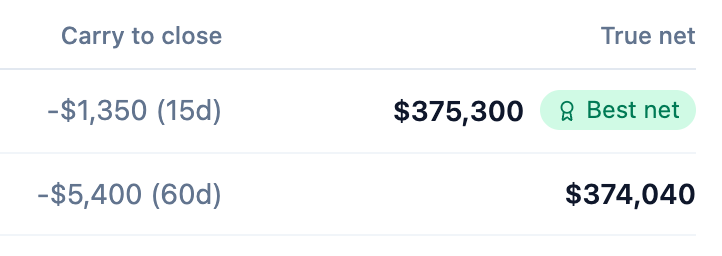
Record each buyer’s terms in Showings & Offers. True Net Offer Ranking deducts commission, selling closing costs, and projected holding costs through each buyer’s closing date.
- Compare the amount, days to close, and estimated net proceeds on each eligible offer.
- Review contingencies before accepting, countering, or rejecting an offer.
- See when a closing timeline is estimated or holding costs are unavailable.
Stage 3 / Closing
Follow the contract through to your profit.
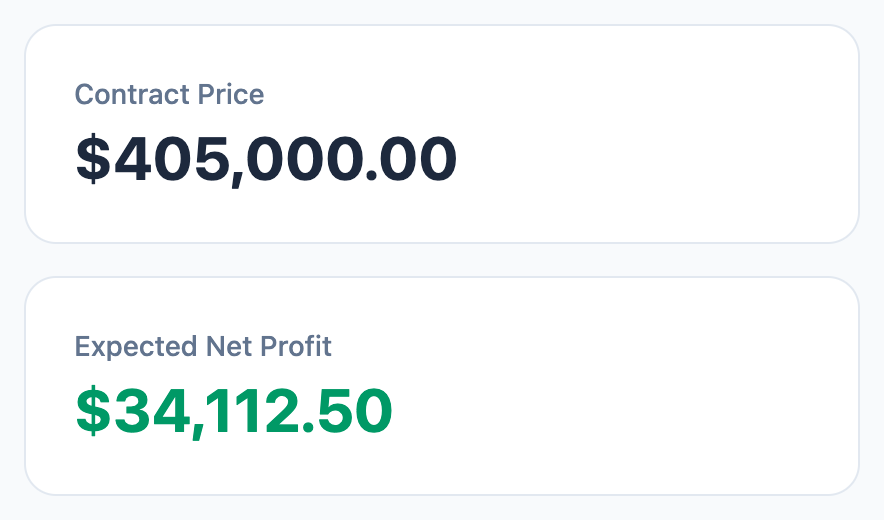
Once you accept an offer, the Closing Checklist helps you track financing, title, the walkthrough, and signing. The P&L Summary keeps the contract price and project costs in view.
- See which checklist items are ready as the project advances through closing.
- Review purchase, rehab, carrying, and selling costs in the profit breakdown.
- After closing, recorded net profit becomes available when the sale price and all costs are confirmed as actuals.
What stays with the property
Your team can revisit a price change, buyer conversation, or closing task in the same project.
Listing record
- Asking price and price history
- Listing dates and agent details
- Showing dates and feedback
Buyer offers
- Closing timeline and contingencies
- Counters and accepted offers
- Return-to-market option if a contract falls through
Sale record
- Expected close date
- Checklist progress by stage
- Project expenses, files, and P&L
Frequently asked questions
How does FlipperPro compare buyer offers?
True Net Offer Ranking uses the offer amount, selling commission, selling closing costs, and available holding costs through closing. It estimates 30 days when an offer has no closing timeline and labels that estimate. If holding costs are unavailable, it shows that they are excluded.
What is the difference between offer proceeds and flip profit?
Offer proceeds estimate what remains of a buyer’s offer after selling costs and the cost of waiting to close. The project P&L also accounts for your purchase, renovation, and other project costs. It labels the profit as projected, expected, or recorded according to the stage and the financial records available.
Can I see what the property was listed for originally?
Yes, when the original asking price was recorded. Price History tracks later changes, dates, and reasons. If tracking began after the property was listed, the original price is marked unknown and the first tracked price provides the baseline.
What carries over from rehab?
The same project moves into the Selling pipeline with its expenses, files, and history. Add listing details, buyer offers, and closing information there as the sale progresses.
Bring your next sale into FlipperPro.
Follow one property from its first asking price to its closing P&L. Start a 7-day Pro trial with no credit card required.